How to Automate Property Management Due Diligence (Without Losing the Human Review)
On this page
A property management due diligence automation job is mostly the same task done hundreds of times. Open the management agreement, find the fees, dates and terms, check them against the software export, type them into a spreadsheet, and move on to the next property.
None of it is hard. All of it is slow. On a portfolio of a few hundred properties, it can take a team weeks.
This guide covers how property management due diligence automation actually works: which parts a machine should handle, which parts your team should keep, and what it looked like when we built it for a firm processing 400 properties at a time.
Why due diligence takes so long
The documents aren’t the problem. A management agreement is readable in a few minutes. The problem is everything around it.
- The data is scattered. Fees and terms live in signed agreements. Property records live in your software export. Owner details may sit in a third spreadsheet. File names rarely follow a pattern.
- Every property means the same steps. Find the file, open it, locate each field, compare it with the other sources, enter it. Then do it again.
- Small differences cause real errors. An address written two ways or a missing unit number is enough to attach the wrong record to the wrong property.
The math adds up quickly. At about 25 minutes per property, a 200-property job is more than 80 hours of review. At 400 properties it is roughly 167 hours, or four working weeks for one person, before anyone has made a single judgment call.
What to automate, and what to keep human
The goal isn’t to remove people from due diligence. It’s to stop people doing the parts a machine does better, so their time goes to the parts only they can do.
| Automate | Keep human |
|---|---|
| Collecting agreements, exports and spreadsheets into one place | Deciding what a non-standard clause means for the deal |
| Pulling fees, dates, terms and owner details out of each agreement | Resolving records the system flags as uncertain |
| Matching each property across documents and software exports | Judgment calls on missing or conflicting information |
| Flagging missing fields, duplicates and conflicts | Conversations with owners, buyers and sellers |
| Filling your existing due diligence spreadsheet | Signing off the final report |
A simple rule: if the task is the same for property 1 and property 400, automate it. If it needs context or a decision, keep it human, and make sure the automation sends it to a person instead of guessing.
How an automated due diligence workflow runs
Here is the workflow we built, in the order it runs. Most due diligence processes follow the same shape, even if the fields differ.
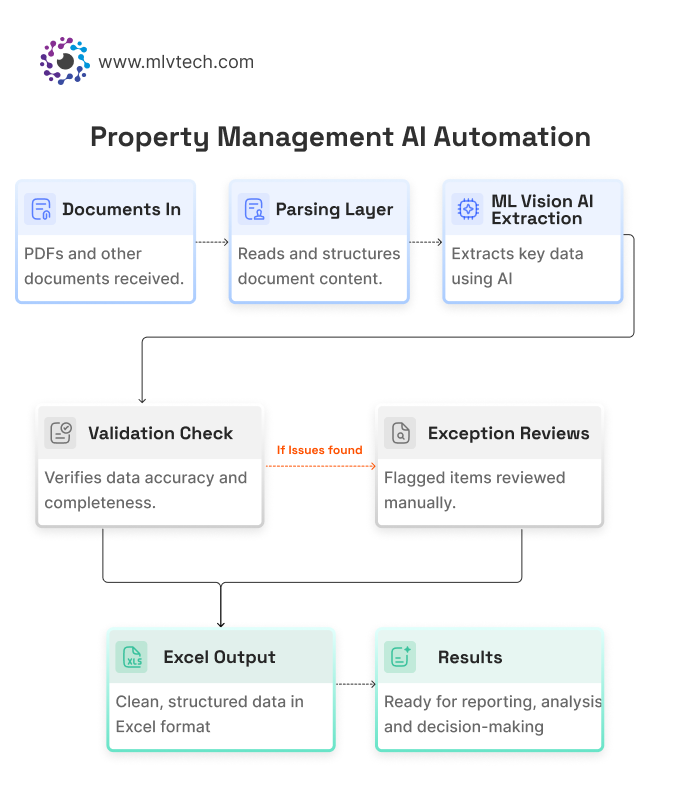
- Ingest the documents. The system collects management agreements, related property documents, software exports and supporting spreadsheets from one shared folder. Your team keeps saving files where they already do.
- Extract the fields. AI reads each agreement and pulls the fields the job needs: fees, dates, ownership details and key terms. In our build that was 28 fields per agreement, including from scanned PDFs.
- Match records across sources. Each property is matched across the agreement, the software export and the reporting files, using normalized addresses, property identifiers and matching rules.
- Detect discrepancies. Missing fields, conflicting values, duplicate records and weak matches are flagged automatically.
- Route exceptions to a person. Anything uncertain goes to a reviewer with the evidence next to it. Nothing is silently assigned.
- Fill the report. Reconciled data lands in the spreadsheet your team already uses, in the same structure, so nothing downstream has to change.
Step 6 matters more than it looks. If automation forces your team into a new tool, adoption stalls. If it fills the file they already trust, it gets used from day one.
The hard part: matching records that don’t line up
Extraction gets the attention, but matching is where due diligence automation succeeds or fails. The same property can appear in three sources three different ways:
- “12 Oak St” in the software export
- “12 Oak Street, Unit A” in the agreement
- “Oak St 12A” in a file name
A person sees instantly that these are the same property. A naive system either misses the match or, worse, makes the wrong one.
What works is a few layers, in order:
- Normalize first. Standardize street types, unit formats, spacing and casing before comparing anything.
- Match on identifiers where they exist. A property ID is more reliable than any address.
- Score the rest. Give each candidate match a confidence level instead of a yes or no.
- Send low-confidence matches to a person. This is the step that makes the output trustworthy.
The review queue is a feature, not a weakness. A workflow that flags a small share of records for a human is far more useful than one that guesses on all of them and is quietly wrong on some.
It’s also why we started our own build with address matching alone, before adding agreement extraction. Get matching right, and everything after it gets easier.
Real example: a 400-property due diligence job
One property management firm runs due diligence across large rent roll portfolios, where reviewing hundreds of properties at once is routine. Before automation, each management agreement review took Kate Braybrook, Director at Rent Roll Solutions, about 25 minutes per property.
We built the workflow above over several months, starting with address matching and expanding into full agreement extraction.
| Before | After | |
|---|---|---|
| 400-property job | ~167 hours (estimated) | 2–3 hours of automated processing |
| Per-property work | ~25 minutes of manual review | Exception review only |
| Output | Typed into Excel by hand | Auto-filled into their existing Excel report |
The team now spends its time on exceptions and judgment calls, while the repetitive document work runs in the background. In Kate’s words, the automation is “saving me dozens of hours on every substantial DD engagement.”
Is your process ready to automate?
Your due diligence is a strong candidate for automation if most of these are true:
- The same fields are pulled from every agreement or document
- A job covers 100 or more properties, or happens several times a year
- Your team re-keys data from PDFs or software exports into spreadsheets
- Mismatched addresses or IDs regularly cause rework
- You already have a report format you want to keep
If that sounds like your team, you don’t need a big rollout to find out whether it works.
Where to start
Pick the single most repetitive step, usually record matching or extracting a fixed set of fields, and automate only that. Run it on a real job. Compare the output with what your team would have produced.
Once that step is saving time and the team trusts it, add the next one. That’s how the workflow above grew, and it’s the lowest-risk way to start.
If you’d like help working out which step to start with, our property management automation work is built around exactly this approach.
Frequently asked questions
Can due diligence be automated for 400+ properties?
Do we need to change our property management software?
What happens when a document is scanned or messy?
Does automation replace the due diligence team?
How long does it take to set up?
Spending weeks on due diligence data entry?
We build due diligence and document automation for property management firms, around the software and spreadsheets you already use. Walk us through your process on a free call, and we'll tell you which step to automate first and what it would save.